
PATH OF EXILE: MIRAGE
Full Review, System Requirements & Download Guide
Path Of Exile a free-to-play online action RPG developed by Grinding Gear Games, set in the dark fantasy world where you experience deep character customization with a massive passive skill tree and endless build possibilities.
Engage in intense combat using powerful skills, gems, and unique item crafting systems.
Explore procedurally generated maps filled with dangerous monsters, bosses, and rare loot. Enjoy updates that can introduce new mechanics, challenges, and seasonal content.
Perfect for fans of ARPGs seeking complex progression and long-term gameplay depth.
Who Should Play PATH OF EXILE
Loot Hunters
People addicted to collecting rare items and upgrades.
They enjoy farming enemies, bosses, and currencies for valuable drops. The constant loot progression keeps them engaged.
Hardcore Challenge
Gamers who enjoy difficult combat and high-risk gameplay.
Boss fights require skill, timing, and strong character builds.
Hardcore mode adds permanent death for extra tension.
Economy & Trading Players
They make wealth through buying, selling, and understanding item value. PoE’s player economy is one of the deepest in gaming.
Long Term Progression Players
Gamers who enjoy games with endless goals and replayability.
There are always new builds, bosses, and challenges to master.
PoE can stay engaging for many of hour.

Genre: Action RPG
Mode: Online
Storage: 40GB
Price: Free to play
How to start playing
If you have a Steam account, you can install and play directly from there.
If you don not have a steam account;
- Click play on steam
- Follow given steps to create steam account
- Install and play the game from there
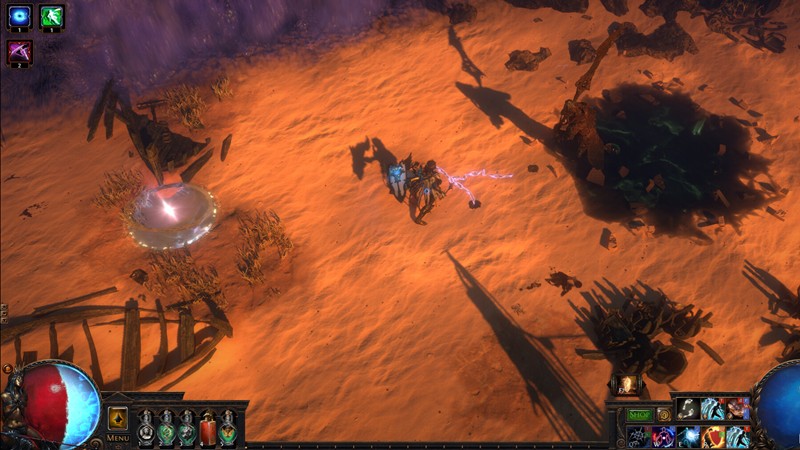
Gameplay Screenshots


System Requirements
Minimum Requirements
OS: Windows 10, (64-bit)
CPU: Quad Core Dual-core 2.6 GHz+
RAM: 8GB
GRAPHICS: NVIDIA GTX 650 Ti / AMD Radeon HD 7850 or better
DIRECTX: 11 Supported
STORAGE: 40GB
Recommended Requirements
OS: Windows 10,11 (64-bit) or better
CPU: Quad-core 3.0+ GHz (e.g., Intel i5 / Ryzen 5 equivalent)
RAM: 8-16GB
GRAPHICS: NVIDIA GTX 1050 Ti / AMD RX 560 or better
DIRECTX: 11
STORAGE: 40GB
Low-Spec Reality Check
What to consider for low-end PCs
Installing the game on SSD will improve the game performance
Minimum playable setup is an old dual-core CPU, 8 GB RAM, and Intel HD 4000–class iGPU.
With such hardware, expect ~10–25 FPS and frequent drops in combat or crowded areas.
Modern Intel GPUs like Intel UHD 620 or Iris Xe can reach ~30–60 FPS in early game content.
Endgame maps and heavy skill effects will still cause stutter and drop in FPS even on better integrated graphics.
SSD storage is almost essential to reduce loading times and reduce hitching.
Overall, it is playable on integrated graphics, but smooth gameplay requires a dedicated GPU.
Check OPTIMIZATION TIPS to know how to set the best settings for smooth game experience
Can't Run This Game? Here's What You Can Do
If your pc does has any issues with this game, too slow, crash, lags, stutter, or fail to launch. You can try other options to still enjoy similar gameplay experience.
Try This Quick Fixes And Test
- Set all graphics options to Low, especially shadows and global illumination
- Lower resolution to 1280×720 or below, and enable dynamic resolution if available
- Turn off VSync, anti-aliasing, motion blur, and post-processing effects
- Close background apps (browser, Discord overlays, recording software)
- Install the game on an SSD to reduce stutter and loading freezes
- Use the “–waitforpreload” launch option if you experience texture hitching
Other Options To Try
If the game isn’t smooth and you really want the experience, you could try other lighter alternatives like similar Mobile Games, or even better by using Cloud Gaming which allows to stream play even games your PC can not handle on its own.
Play On Smart Phone And Similar Mobile Phone Versions Games Like PATH OF EXILE
PATH OF EXILE or more other games by Cloud. Even With Very Low End PCs
Optimization Tips
How to optimise settings for smooth gameplay
Gameplay Tips
Tips and tricks you can try while playing PATH OF EXILE
How To Download & Start Playing
Check different ways to access the game and choose what suits you
Official Methods
Related Games

Dota 2
Free to play

League Of Legends
Free to play
Smite 2
Free to play