
LEAGUE OF LEGENDS
Review, System Requirements & Download Guide
League Of Legends is a team-based online strategy game where two teams of five players compete to destroy the enemy Nexus while defending their own base. Players select champions with unique abilities, strengths, and combat roles. The game combines fast-paced action, tactical decision-making, and teamwork.
League of Legends offers ranked gameplay, seasonal updates, and a constantly changing competitive meta.
It is one of the most popular esports titles, with global tournaments and professional leagues.
Who Should Play LEAGUE OF LEGENDS
Competitive Players
Players who enjoy ranked matches, climbing leaderboards, and improving their skills against real opponents. They thrive in high-pressure games that reward teamwork and strategy.
Esports & Competitive Scene Fans
Players who enjoy watching professional tournaments, following esports teams, and experiencing the same competitive environment as pro players. They like games with an active global community and evolving meta.
Strategic Thinkers
Players who like planning tactics, controlling objectives, and making smart in-game decisions. They enjoy mastering map awareness, timing, and champion matchups.
Team Oriented

Genre: Multiplayer Online Battle Arena (MOBA),
Mode: Online
Storage: 15GB
Price: Free to play
How to start playing
If you have a Epic Game Store account, you can install and launch game from there.
- Click Play fromEpic Games store, log in or create accont
- Search for League of Legends in the store.
- Click Get / Install (it will still install the Riot Client).
- Launch the game through Epic, then it opens the Riot Client automatically.
- Log in with or create a Riot account to start playing.
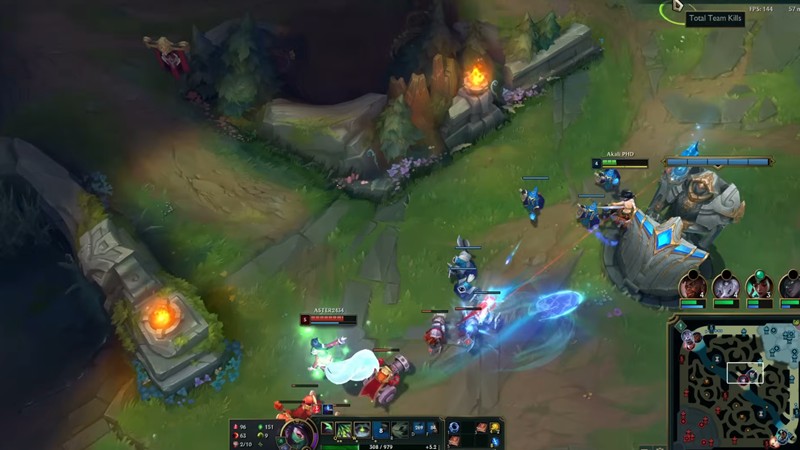
Gameplay Screenshots


System Requirements
Minimum Requirements
OS: Windows10, 11 (64-bit)
CPU: Intel Core i3-530 or equivalen
RAM: 4GB
GRAPHICS: Intel HD 4600 or equivalent GP
STORAGE: 16GB
Recommended Requirements
OS: Windows 10,11 (64-bit)
CPU: Intel Core2 i5 or better
RAM: 8GB+
GRAPHICS: NVIDIA GeForce GTX 660 / AMD Radeon HD 7870 or better
STORAGE: 16GB
Low-Spec Reality Check
What to consider for low-end PCs
Installing the game on SSD will improve the game performance
League Of Legends is very friendly for low-end PCs compared to most modern competitive games. It can run on older laptops with integrated graphics, 4 GB RAM, and basic dual-core processors if settings are lowered. For stable gameplay, players usually reduce shadows, effects, and resolution to maintain smooth FPS during team fights. A weak internet connection can still cause lag even if the PC runs the game properly. While the game is lightweight, long sessions on very old systems may still lead to overheating or FPS drops.
Check OPTIMIZATION TIPS to know how to set the best settings for smooth game experience
Can't Run This Game? Here's What You Can Do
If your pc does has any issues with this game, too slow, crash, lags, stutter, or fail to launch. You can try other options to still enjoy similar gameplay experience.
Try This Quick Fixes And Test
- Lower resolution to 720p and set graphics to Very Low.
- Disable shadows, anti-aliasing, and unnecessary visual effects.
- Close background apps like browsers, Discord streams, or downloads before playing.
- Enable “Low Spec Mode” inside the game client settings.
- Update graphics drivers and Windows for better stability.
- Use an SSD if possible to reduce loading times and stuttering.
Other Options To Try
If the game isn’t smooth and you really want the experience, you could try other lighter alternatives like similar Mobile Games, or even better by using Cloud Gaming which allows to stream play even games your PC can not handle on its own.
Play On Smart Phone And Similar Mobile Phone Versions Games Like LEAGUE OF LEGENDS
Explore Stream Play and be able to more games by Cloud. Even With Very Low End PCs
Optimization Tips
How to optimise settings for smooth gameplay
Gameplay Tips
Tips and tricks you can try while playing League Of Legends
How To Download & Start Playing
Check different ways to access the game and choose what suits you
Official Methods
Related Games

Dota 2
Free to play

Path Of Exie Mirage
Free to play

RuneScape
Free to play